Maze generators for KDP puzzle books: formats and print size
Maze generators for Amazon KDP need large cells, trim-size PDFs, and commercial licensing. Here's what works.
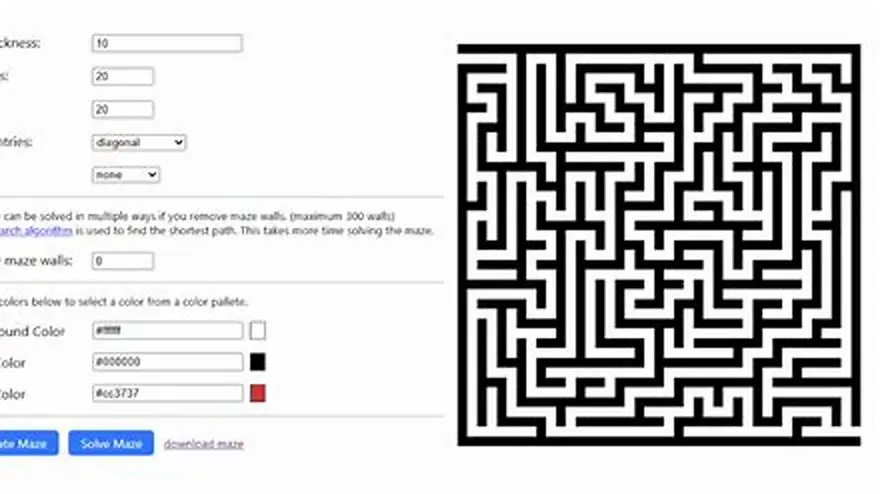
Most maze generators produce small web graphics unsuitable for KDP. You need tools that export 8.5 × 11 inch or 8 × 10 inch print-ready PDFs with cell walls at least 2-3 mm thick and commercial-use rights. Free options exist but require manual formatting.
On this page (8 sections)
- The short version
- Why most maze generators fail for KDP puzzle books
- Which maze generators produce large-print puzzles
- How to format maze output for KDP
- Free versus paid options for commercial use
- Tips for ensuring maze puzzles meet KDP print standards
- Grid size and difficulty settings for older readers
- Questions people still ask
Part of our guide on designing for older adults
Generic maze generators create tiny web images; KDP needs print-ready PDFs with thick walls and commercial licensing.
| Minimum wall thickness | 2-3 mm for readability |
|---|---|
| Standard KDP trim sizes | 8.5 × 11 or 8 × 10 inches |
| Print resolution | 300 dpi minimum |
| Grid size for seniors | 15 × 15 to 20 × 20 cells |
| Free tools available | Yes, with manual formatting |
The short version
- KDP mazes need cell walls 2-3 mm thick to stay readable in print
- Export to 8.5 × 11 inch or 8 × 10 inch PDFs at 300 dpi minimum
- Free maze generators require manual resizing and formatting for print
- Verify commercial-use licensing before selling any maze content
- Test-print one maze before generating a full book to check readability
Why most maze generators fail for KDP puzzle books
Most online maze generators produce small PNG or SVG files meant for screens, not print. The walls come out thin, the cells tiny, and the output size wrong for Amazon KDP trim requirements. A maze that looks fine on a monitor prints as a gray blur at 8.5 × 11 inches. The cell walls measure under 1 mm and vanish when printed.
KDP requires print-ready PDFs at specific trim sizes. The platform accepts dozens of trim options, but large-print puzzle books typically use 8.5 × 11 inches in the US or 8 × 10 inches for a slightly smaller format. Generic maze tools output 800 × 800 pixel images with no bleed, no margins, and no way to set a physical page size. You end up resizing low-resolution graphics in Word or Canva, and the lines pixelate.
Commercial licensing matters more than most sellers realize. Free maze generators often prohibit use in products for sale, or they require attribution on every page. Read the terms before you build a book. Some tools allow personal use only; selling mazes generated under those terms puts your KDP account at risk if the tool owner files a complaint.
Large-print mazes for older adults demand thicker walls and bigger cells than standard puzzles. Cell walls need to measure 2-3 mm thick on the printed page so readers with low vision can trace the path without losing it. A 30 × 30 cell maze that works for kids becomes illegible for seniors. Stick to 15 × 15 or 20 × 20 grids and leave generous white space around each puzzle. It helps to understand free word search generator commercial before going further.
Which maze generators produce large-print puzzles
BigPrint Puzzle Studio was built specifically for KDP sellers creating large-print puzzle books. We make this tool, so we'll say plainly what it does. It generates mazes and seven other puzzle types as print-ready PDFs at KDP trim sizes, with cell walls thick enough for older readers. You pick the grid size, set the difficulty, and export a full book in minutes. The mazes come out at 300 dpi with proper margins and bleed.
The tool includes a wrap-around cover maker and Amazon listing helper, which saves the formatting work most sellers spend hours on. One $17 payment covers unlimited books with no monthly fee. It runs on up to three computers. The limitation: you cannot edit individual maze paths after generation. If you need a maze with a specific shape or custom entry and exit points, you'll need design software instead.
Maze Generator Pro is a Windows desktop app that exports mazes as high-resolution images. It offers dozens of algorithms, from simple recursive grids to Prim's and Kruskal's spanning trees. You control wall thickness, cell size, and output resolution. The app costs around $30 to $40 depending on the version and allows commercial use. The catch: it exports images, not PDFs, so you still need to lay out pages in Canva, Word, or InDesign. For the detail, see our notes on best free puzzle book tools.
Python scripts using libraries like mazelib or pyamaze can generate mazes in any size and export them as vector PDFs. This route gives you total control over every dimension, but it requires coding skill. You write a script that sets the grid size, wall thickness in points, page dimensions, and margin sizes, then loops to generate a book's worth of puzzles. Free, unlimited, and fully customizable, but not beginner-friendly.
How to format maze output for KDP
KDP accepts PDF files with exact trim sizes and requires 0.125 inch bleed on all sides for books with color or full-page graphics. Your maze needs to extend to the bleed edge if it fills the page, or sit within safe margins if it doesn't. Most sellers center each maze with a 0.75 to 1 inch margin on all sides, keeping the puzzle well inside the trim line. That margin also leaves room for a page number and book title in the header or footer.
Set your document to 300 dpi minimum when exporting. Lower resolutions produce fuzzy lines. If you're working in Canva, create a custom document size matching your trim dimensions, then export as PDF (Print). In Word, set the page size under Layout > Size > More Paper Sizes, and export as PDF with high-quality output selected. Check the file in Adobe Reader at 100% zoom before uploading to KDP.
Maze walls must stay consistent in thickness across every page. A wall that measures 0.08 inches (roughly 2 mm) on page one should measure the same on page fifty. Inconsistent line weights look sloppy and confuse readers. If you're generating mazes individually and combining them, use the same tool settings for every puzzle. Mixing sources or algorithms creates visual mismatches.
Include an answer key for each maze, either on the reverse of the page or in a solutions section at the back. Readers appreciate the backup, and it pads your page count, which raises your print cost slightly but also lets you charge a bit more. The answer can be a traced red line through the correct path, or a second copy of the maze with the solution highlighted. Keep the answer page layout identical to the puzzle page so the book feels cohesive.
- Set your document to the KDP trim size: 8.5 × 11 inches or 8 × 10 inches.
- Generate mazes at 300 dpi with walls 2-3 mm thick.
- Center each maze with 0.75 to 1 inch margins on all sides.
- Add page numbers and a header or footer with your book title.
- Export as PDF (Print) and check wall thickness at 100% zoom.
- Upload a test file to KDP and order a proof copy before going live.
Free versus paid options for commercial use
Free maze generators like Daedalus and Maze Generator by Dirtcube produce high-quality mazes, but most restrict commercial use. Daedalus allows personal and educational use; selling puzzles generated with it violates the license. Maze Generator by Dirtcube offers a free tier for personal projects and a paid license for commercial work. Always read the license page or contact the developer before building a book.
Online tools like MazeMaker.io and Inkscape's maze extension let you create mazes for free and export as SVG or PDF. MazeMaker.io explicitly allows commercial use under a Creative Commons license, which is rare. Inkscape's maze plugin generates perfect mazes as vector paths, and since Inkscape is open-source, you can use the output commercially. The downside: Inkscape has a steep learning curve if you've never used vector software.
Paid tools cost anywhere from $15 to $50 and grant full commercial rights. The one-time fee removes licensing worry and often includes faster generation, more algorithms, and better export options. If you plan to publish multiple puzzle books, the cost pays for itself in saved time. Free tools require manual formatting, so each book takes longer to complete.
Public domain mazes, generated decades ago and now out of copyright, can be scanned and republished. Sites like archive.org host old puzzle books from the 1940s and 1950s. The mazes are free to use, but the print quality varies and the designs look dated. You'll spend time cleaning up scans and redrawing walls, which defeats the purpose of using a generator.
| Tool | Cost | Commercial use | Export format |
|---|---|---|---|
| BigPrint Puzzle Studio | $17 one-time | Yes | PDF, KDP-ready |
| Maze Generator Pro | $30-$40 one-time | Yes | PNG, JPEG, high-res |
| MazeMaker.io | Free | Yes (CC license) | SVG, PNG |
| Inkscape maze plugin | Free | Yes | SVG, PDF |
| Daedalus | Free | No (personal use only) | BMP, Windows metafile |
Tips for ensuring maze puzzles meet KDP print standards
Order a proof copy before you publish. KDP's digital previewer shows layout but not true print quality. A physical proof reveals whether your walls are thick enough, whether the ink saturates evenly, and whether the puzzles look crisp or muddy. Proof copies cost a few dollars plus shipping and arrive in five to seven days. Fix any problems before you make the book available for sale.
Check your PDF at 100% zoom and 200% zoom in Adobe Reader before uploading. Zoom in on a maze corner and look at the wall edges. If you see jagged pixels or gray anti-aliasing halos, your resolution is too low or your export settings compressed the file. Re-export at higher quality. KDP accepts files up to 650 MB, so file size is rarely a constraint.
Avoid ultra-thin fonts for page numbers and headers. A 6-point serif font in light gray can vanish in print. Use at least 10-point bold sans-serif for page numbers and keep them black or dark gray. The goal is readability, not decoration. Seniors buying large-print books expect every element to be easy on the eyes.
Run a test print on your home printer first if you have one. Print at actual size (no scaling) on plain white paper. Hold it at arm's length under normal room light. If you can't follow a path without squinting, the walls are too thin or the grid too fine. Adjust before ordering a KDP proof.
Consistent spacing between puzzles matters more than you'd think. If one maze sits 1 inch from the top and the next sits 1.25 inches down, readers notice. Use a template or master page to lock in margins, headers, and puzzle placement. That consistency makes your book look professionally produced rather than hand-assembled.
- Order a proof copy: digital previews do not show true print quality
- Zoom to 200%: check for jagged lines or pixelation before uploading
- Use 10-point bold fonts: headers and page numbers must stay readable
- Test-print at home first: catch wall thickness problems early
- Lock in a template: consistent spacing across all pages looks professional
Grid size and difficulty settings for older readers
A 15 × 15 grid works well for easy mazes. Larger grids increase difficulty, but anything over 25 × 25 cells becomes hard to follow for readers with low vision. The path twists more, dead ends multiply, and the whole puzzle shrinks to fit the page. Stick to 15 × 15 or 20 × 20 for large-print books aimed at seniors.
Wall thickness matters more than grid size. A 20 × 20 maze with 3 mm walls stays readable; a 15 × 15 maze with 1 mm walls does not. If your generator lets you set line weight in points or millimeters, start at 8 points (roughly 2.8 mm) and print a test. Adjust up or down from there.
Difficulty often comes from algorithm choice rather than grid dimensions. A recursive backtracker creates long, winding corridors with few branches. Prim's algorithm produces more branching and shorter paths. Most KDP sellers use simple recursive mazes because they look classic and readers recognize the style. If your tool offers algorithm options, test two or three and see which prints best.
Space between cell walls should be wide enough for a felt-tip pen. Some readers like to draw their solution directly on the page. If the corridors measure under 5 mm wide, a pen tip obscures the path. Leave at least 6-8 mm between walls, which translates to a grid that doesn't exceed 20 × 20 cells on an 8.5 × 11 inch page with margins.
Include a mix of easy and moderate puzzles in the same book. Start with five to ten 15 × 15 grids, then move to 18 × 18 or 20 × 20 in the middle, and finish with a few easier ones again. That pacing keeps readers engaged without frustrating them early on. Label each section or note the difficulty at the bottom of the page so readers can skip ahead if they want.
Questions people still ask
Can I use mazes from free online generators in a book I sell on KDP?
Only if the generator's license explicitly allows commercial use. Most free tools restrict use to personal or educational projects. Check the terms of service or contact the developer before publishing. Tools like MazeMaker.io offer free mazes with commercial rights under a Creative Commons license, but many others do not.
What resolution should I use when exporting mazes for print?
Export at 300 dpi minimum. Lower resolutions produce blurry or pixelated lines when printed. If your generator outputs only 72 dpi web images, you'll need to redraw the maze in vector software or use a different tool. KDP accepts high-resolution PDFs up to 650 MB, so file size is not a limit.
How thick should maze walls be for large-print puzzle books?
Aim for 2-3 mm thick walls on the printed page, which translates to about 6-9 points in design software. Walls thinner than 2 mm become hard to follow for readers with low vision. Print a test page at actual size to check readability before generating a full book.
Do I need bleed for KDP maze books?
Yes, if your mazes extend to the page edge. KDP requires 0.125 inch bleed on all sides for full-color or full-page content. Most sellers center mazes within 0.75 to 1 inch margins, which keeps the puzzle inside the trim line and eliminates the need for bleed. Either approach works; pick one and stay consistent.
What trim size works best for large-print maze books?
8.5 × 11 inches is the most common trim size for large-print puzzle books in the US. It gives you room for big grids and generous margins. 8 × 10 inches works if you want a slightly smaller, more portable book. Both sizes print reliably on KDP and match reader expectations.
Ready to try it? It generates KDP-ready maze PDFs at the right trim size, resolution, and wall thickness for large-print books.
Make KDP maze books