Printable Birthday Cards for Seniors in Large Print
A printable birthday card for seniors in large print uses big dark type on matte card stock, folded once. Start with a free template, print at full size, and keep the message short.
On this page (8 sections)
- Quick recap
- What makes a birthday card readable at arm's length?
- Where to find printable birthday cards for seniors in large print
- How to print a card that folds clean and reads clear
- What to write inside when eyesight is limited
- A card plus a little extra: tuck in a word search
- Mistakes that spoil a homemade birthday card
- Still wondering?
Part of our guide on christmas gifts for dementia patients
Key figures
- Card size
- 5 x 7 in, US common
- Greeting type
- 18 to 24 pt to test
- Card stock
- 200 to 300 gsm, scored
- Print setting
- 100 percent, not fit to page
- Test print
- Plain paper first
- Fold
- Score once, then fold
Quick recap
- Choose a plain template with one clear picture.
- Make cards a week before the day, and keep one spare blank card.
- Keep the inside message to a few short lines, signed on separate lines.
- Tuck a birthday word search inside to turn the card into a small gift.
What makes a birthday card readable at arm's length?
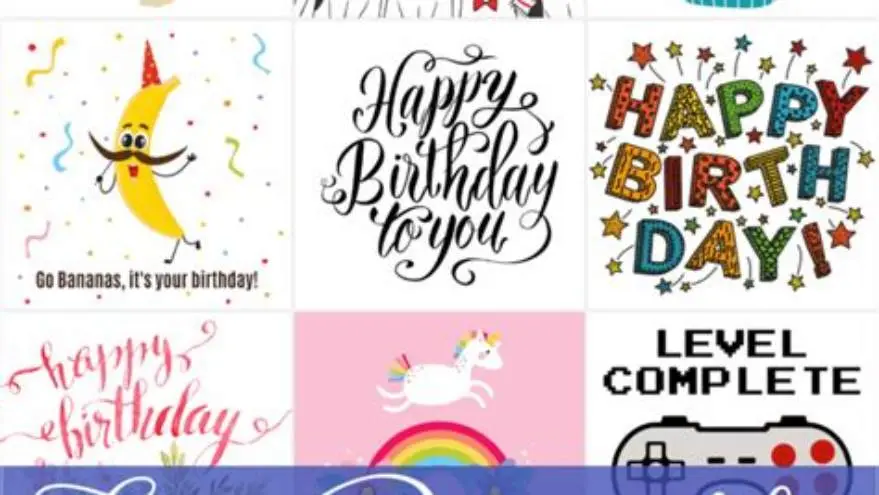
Cards fail at the first glance when the greeting is small, pale, or crammed into a corner. Older eyes need letters with clear shapes and space around them. Cards must also work in ordinary room light, not under a lamp held close. Big dark type on a light surface fixes most of it, with short lines and room to breathe. Nothing on the card should ask the reader to squint, tilt the page, or hunt for glasses.
Start testing at 18 to 24 point for a plain sans-serif greeting, and adjust up or down after a printed arm's-length test. That size reads at arm's length for most people. It still fits a short message on a folded card. For a reader who uses a magnifier for most print, go larger still. Shorten the message rather than shrinking the type. Type size decides whether the card gets read or set aside. Treat it as the rule, not a detail.
Contrast matters as much as size. Dark brown ink on white or cream paper reads far better than gold script on a dark background. Foil looks pretty in the shop and fights the eye at home. Glossy paper adds glare under ceiling lights, so matte card stock is the safer pick. Plain-looking cards often read best on the table. Choose legibility first and let the picture do the celebrating.
Where to find printable birthday cards for seniors in large print
Free card makers give you a finished design in minutes. Most let you change the words before you print. Canva's free tier holds birthday templates you can open in a browser, retype in large type, and download as a PDF. Greetings Island and Office Templates Online work the same way. Both offer printable cards with no account needed. Pick a template with a plain background and one clear picture, since a busy pattern fights the words. The other half of this decision is printable match cards with words and pictures for low literacy.
Look at the export before you spend time on the wording. A good source offers a PDF sized for printing, not a small picture file meant for a phone screen. Find a download button that says PDF or print. Skip any site that hides the download behind a paid plan or stamps a watermark across the front. American Greetings and similar services sometimes offer printable cards through a trial membership. Check the site's current terms before relying on a free trial. That suits a one-off card but not a regular habit. Free does not have to mean flimsy.
None of these sites is built for low vision, and that gap is the same everywhere. Their templates use pretty type at ordinary sizes, so making the card readable falls to you. That is the whole point of this page. Take any free template, raise the type, darken the ink, and print it on card stock. The design comes from the site. Readability comes from your settings.
| Source | Cost | What you get |
|---|---|---|
| Canva free tier | Free | Birthday templates you can retype and download as a PDF |
| Greetings Island | Free | Printable cards, no account needed for basic designs |
| Office Templates Online | Free | Editable templates with PDF, PNG or JPG download |
| American Greetings | Trial membership | Printable cards, free for the trial period |
How to print a card that folds clean and reads clear
Most home printers can turn out a card that looks shop-bought, as long as the size and paper are right. In the US, a common folded greeting-card size is 5 by 7 inches, and other regions use different sizes. Test the fit with your envelope before the final print. It fits a standard A7 envelope and folds from one sheet of letter paper. Set the print size to 100 percent, never fit to page. Shrinking the design also shrinks the type and moves the fold. Set the printer for card stock or heavy paper so the ink dries properly and the feed does not jam. We go through large print word search book gift ideas step by step elsewhere on the site.
Paper weight decides how the card feels in the hand. Heavier card stock, around 200 to 300 grams per square metre, usually feels firmer than copy paper and folds cleanly if scored. Most home printers take it with the tray set right. Plain copy paper curls at the edges and feels thin. Keep it for everyday printing, not for cards. Check the printer manual for the heaviest stock it accepts before you buy a pack. For most casual users, a single pack may be enough for a year of cards, depending on pack size and how many cards you print.
Folding is where homemade cards usually go wrong. Score the fold first with the edge of a ruler pressed along the line. Fold the paper toward the score so the printed side does not crack. A clean fold makes the card stand up on a shelf instead of flopping open. For a card travelling by post, slip it into the envelope with the fold at the bottom. Bottom-folded cards survive the sorting machine.
- Download the card as a PDF at print size, not as a small image.
- Load one sheet of card stock and set the printer to heavy paper.
- Print a test copy on plain paper and read it at arm's length.
- Mark the fold with a ruler and a blunt edge, then fold once.
- Sign the inside in large dark letters, with room to spare.
What to write inside when eyesight is limited
Inside the card, the message is the part the birthday person actually reads, so give it the same care as the front. Three or four short lines beat a long paragraph. A line that says one thing is easier to follow than a line that says three. Write in plain words, the way you would speak across the table. Short lines say enough: happy birthday, thinking of you today, hoping the year brings good days.
Set the inside message in the same large type as the front, or larger. Many templates leave the inside blank. That blank space is a gift. Type your message in the same file, or write it by hand in a dark pen with tall letters. Leave a clear space at the bottom for signatures. Names squeezed into a corner are the hardest part of any card to read. Each person signs on a fresh line, in their own hand.
Skip the long poem and the tiny verse printed inside shop cards. Short words of your own carry more weight than a verse nobody can read. They leave the card feeling personal rather than bought. For a birthday person with memory loss, keep to one warm sentence and a name they know well. Think of it as a hello, not a letter. Keep it short and let it be read.
A card plus a little extra: tuck in a word search
Once a card is opened and read, it usually goes on the shelf. Tuck a small puzzle inside and the birthday person has something to do with it after the candles are out. Put a birthday word search on a second sheet, fold it once, and slip it behind the card. Cake, candles, birthday, family, and friends make a gentle puzzle. Many people can finish a small, beginner-level word search in ten minutes or less. Adjust the difficulty for your audience. The card becomes a small gift instead of a greeting alone.
Our own free Large Print Word Search Maker turns a word list into a large-print puzzle with an answer page. It costs nothing to use. Type in the birthday words and print the puzzle at the same large size as the card. Tuck the answer page behind it for the helper. The tool only makes word searches, so it will not design the card itself. Pair it with any free card template and the two pages work as a set.
Hand-written words work just as well for a one-off card. Write ten birthday words on lined paper in large letters. Draw a simple grid around them. Let the birthday person circle each word as they find it. Joy comes from the doing, not the puzzle itself. Ten more pleasant minutes on a birthday, in print big enough to enjoy, is the point. Cards with a puzzle inside get kept longer than cards alone.
Mistakes that spoil a homemade birthday card
Homemade cards usually fail on the same few points, and all of them are easy to avoid. Thin paper lets the ink show through, so the greeting on the back shows on the front. Printing at fit to page shrinks the whole design, including the type you worked to enlarge. Low ink turns dark letters grey, so check the ink level before the final print. Each slip is small with a big cost: a card nobody can read.
Cramming too much onto the page is the second common slip. One picture, a border, a verse, and three signatures leave no room for the greeting. Leave white space around the words, and let one picture do the work. An empty-looking design usually means the type is the right size. Full is not the same as festive. Cards that breathe read better than ones that shout.
Posting late is the last slip, and it happens because the card was not ready. Make birthday cards a week before the day. Keep a spare blank card and envelope in the drawer for the birthday you forgot. Simple cards sent on time beat perfect cards that arrive late. Habit matters more than design here. One spare card in a drawer saves more birthdays than any template.
Still wondering?
Can I print a birthday card on a normal home printer?
Yes, if the printer takes card stock. Load one sheet at a time, set the paper type to heavy or card stock, and print a test copy on plain paper first. When the printer jams on thick stock, print on the heaviest paper it accepts and mount the card on a folded sheet.
What envelope fits a printable birthday card?
Pick up A7 envelopes before you print, since they fit the usual folded card. Check the fit with a test fold before you print the final copy. Forcing a card into its envelope means it was printed too large.
How do I make the inside message easier to read?
Use the same large type as the front, keep the message to three or four short lines, and sign names on separate lines. Dark ink on light paper beats any colour combination. Writing by hand calls for a thick pen and tall letters.
Are free printable birthday cards really free?
Templates on Canva's free tier, Greetings Island, and Office Templates Online cost nothing to download and print. Look at the export screen before you start, since some sites charge for a PDF or add a watermark. Sites that ask for payment at the download step are not free, whatever the front page says.