Printable match cards for low literacy
Design printable match cards with clear fonts and photos to support low literacy and memory, plus create personal photo reminiscence cards at home.
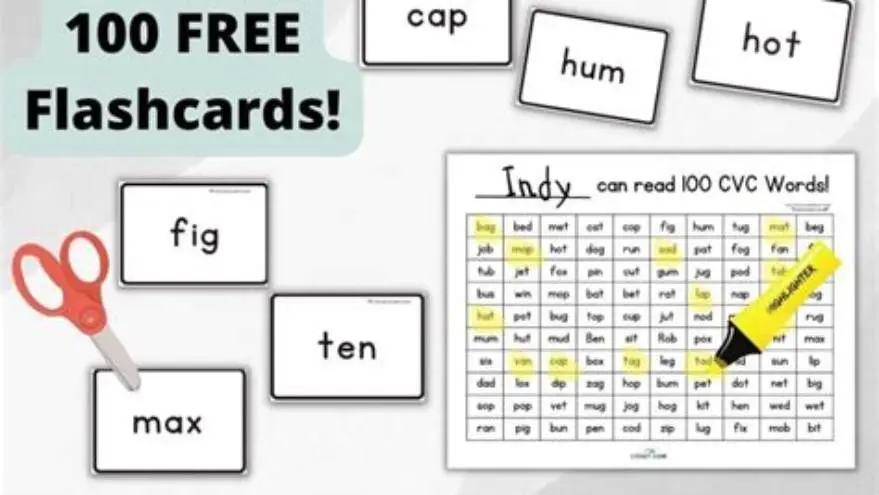
Pairing words and pictures on printable match cards for low literacy demands large fonts (16-24 pt), clear simple images sized about 2x2 inches, and pacing activities to suit mixed abilities by limiting simultaneous cards to 6-8 pairs.
On this page (8 sections)
- Key takeaways
- Choosing fonts and image sizes for low literacy match cards
- How to pace match card activities for mixed ability groups
- Design rules for pairing picture and word cards for easy recognition
- Creating photo-based reminiscence cards to print at home
- Free and digital tools for making printable match cards
- Printable match cards with words and pictures for low literacy
- Questions people still ask
Part of our guide on activity ideas for nursing homes
Clear rules for making printable word and picture match cards that aid low literacy and memory with photo reminiscence options.
| Font size | 16-24 pt |
|---|---|
| Image size | 2x2 inches |
| Card pairs per session | 6-8 pairs |
| Recommended font | Sans-serif |
| Photo cards | Home printable |
Key takeaways
- Use sans-serif fonts at 16-24 point size for readability.
- Select clear, simple images about 2 by 2 inches for easy visual matching.
- Introduce 6-8 card pairs per session to prevent cognitive overload.
- Photo reminiscence cards can be made at home by printing personal photos paired with short labels.
- Consider mixed ability pacing by repeating and reviewing before adding new cards.
Choosing fonts and image sizes for low literacy match cards
Match cards designed for adults with low literacy need clear and consistent font choices. Sans-serif fonts such as Arial or Verdana at 16 to 24 point size work best. Smaller than 16 pt risks poor legibility for older eyes or cognitive challenges. Larger than 24 pt can waste card space and make layout awkward.
Images paired with words must be simple, high-contrast, and easily recognizable. Photographs or line drawings sized approximately 2 by 2 inches usually balance clarity with enough space on standard index cards or printable templates. Complex images confuse users or slow recognition.
Avoid decorative fonts or stylized images that distract or complicate the match task. Both text and image should anchor on the same concept with no ambiguity, e.g., a clear apple photo with the word 'apple' beneath.
Card color backgrounds should be neutral or high contrast to the text color, commonly black text on white or pale pastel backgrounds. This prevents visual strain and supports focused matching. We cover easy word games to play in its own article.
How to pace match card activities for mixed ability groups
Limit the number of card pairs in each matching round to between 6 and 8 pairs. Introducing more cards at once overwhelms players with low literacy or memory challenges, causing frustration or disengagement.
Start each session by reviewing cards introduced previously, reinforcing recognition and recall. Gradually add 1-2 new pairs once prior cards are mastered. This pacing supports learners at different speeds and keeps the group engaged.
Allow flexibility for participants to handle the cards at their own pace, letting those who need longer time focus without pressure. Group activities should be inclusive, with facilitators ready to assist individuals as needed. The other half of this decision is accessible calendars for care homes.
For larger groups, split players into smaller teams or pairs to keep interaction manageable. This reduces distraction and lets everyone participate meaningfully during matching.
Regular breaks help maintain attention spans especially when cognitive impairments are present. Sessions of 15-20 minutes usually fit best before switching tasks or pausing.
Design rules for pairing picture and word cards for easy recognition
Each card pair must reflect the same referent without ambiguity. Words should be common, high-frequency vocabulary familiar to older adults, e.g., 'cat', 'car', 'chair'. Uncommon words or abstract concepts reduce recognition reliability. We cover activities for varied abilities in its own article.
Picture clarity is crucial. Use photos with minimal background clutter or simple line drawings with bold outlines. This enhances instant identification, a key to effective matching for low literacy players.
Keep word placements consistent: centered below the picture with adequate spacing. Avoid crowding text or images. Consistency aids habit formation and eases cognitive load during matching.
If printing double-sided cards, place the word on one side and the picture on the other. This helps users connect the two items actively during play, rather than relying on text or image alone. We go through monthly activity calendar ideas for seniors step by step elsewhere on the site.
When using photo reminiscence cards, pair personal or meaningful photographs with short, clear labels describing the person, place, or object. This approach triggers memory and conversation, boosting engagement beyond simple matching.
| Feature | Best Practice | Why it matters |
|---|---|---|
| Font type | Sans-serif (Arial, Verdana) | Improves clarity and legibility |
| Font size | 16-24 pt | Fits older eyes and low literacy needs |
| Image style | Clear photo or simple line drawing | Enhances immediate recognition |
| Image size | 2 x 2 inches | Balances detail and card space |
| Word placement | Centered below image | Supports pattern recognition |
Creating photo-based reminiscence cards to print at home
Photo reminiscence cards stimulate memory and conversation by connecting familiar faces, places, or objects with simple descriptive words. You can create these at home using digital photos and a printer.
Start by selecting photos that are clear, relevant, and free of distracting background. Crop images tightly around the subject to maximize visibility at about 2 by 2 inches print size. Use free image editing tools like Paint, Preview, or online editors to resize and crop. If that sounds like your situation, read up on how to run a senior puzzle club next.
Pair each photo with a short label (1-3 words) identifying the subject plainly, e.g., 'Grandma Lucy', 'Beach', or 'Dog'. Use a large, sans-serif font at 16-24 pt size below the photo.
Arrange photos and labels on a printable template sized for cardstock or thick paper. Templates can be found free online or made manually in word processors or design software.
Print on heavy paper for durability, then cut out with scissors or a paper cutter. Laminate cards if possible to extend lifespan when used repeatedly.
Photo cards can be personalized for the individual or group to increase engagement and emotional connection, boosting the activity's meaningfulness.
- Select and crop clear, relevant digital photos.
- Add a short clear label using a large sans-serif font.
- Arrange pairs on printable card templates sized about 3x4 inches.
- Print on cardstock and cut out carefully.
- Laminate cards for durability if desired.
Free and digital tools for making printable match cards
You can use free tools like Microsoft Word, Google Docs, or free graphic programs such as Canva to design match cards. These allow insertion of photos and text, resizing elements, and printing on standard paper or cardstock.
Set your page layout to a grid that fits the card size you want (e.g. 3x4 inches or 4x6 inches). Insert images and add text blocks below each photo. Keep font size and style consistent across cards.
Check print settings to ensure actual size outputs, not fit-to-page or scaled prints, which can distort your carefully measured layout.
For batch creation and more ease, consider using BigPrint Puzzle Studio, which is designed mainly for large-print puzzles but can create simple printable activities quickly. It supports large fonts and may save time over manual design. It does not specialize in photo reminiscence cards but offers a straightforward interface for consistent text formatting.
Manual methods allow more personal control and zero cost, but take more time and patience. Digital tools speed production, especially for multiple themed sets.
| Method | Cost | Ease of Use | Customization | Best for |
|---|---|---|---|---|
| Manual using Word/Docs | Free | Moderate | High | Small sets, personal photos |
| Free graphic software (Canva) | Free | Moderate | Very high | More design control |
| BigPrint Puzzle Studio | One-time purchase | Easy | Moderate | Large-print word-based cards |
Printable match cards with words and pictures for low literacy
Printable match cards with words and pictures designed for low literacy combine clear, large text with simple, identifiable images sized about 2x2 inches. Use fonts between 16 and 24 points in readable sans-serif styles like Arial.
Keep the number of card pairs to 6-8 per session to avoid overload, especially with mixed ability groups. Repeat and review cards regularly before adding new pairs to support memory and confidence.
Photo-based reminiscence cards can be created at home by printing personal photos paired with simple labels, increasing engagement for individuals with memory loss or low literacy.
Using these design principles improves recognition, reduces frustration, and helps participants enjoy matching activities in group settings or one-on-one.
For quick, consistent creation of large-print activities, consider tools like BigPrint Puzzle Studio. It supports clear fonts and layouts but lacks photo-specific features, so homemade photo cards remain necessary for reminiscence.
Balancing text size, image clarity, and session pacing is the key to successful match card activities that all participants look forward to.
Questions people still ask
What font size is best for low literacy match cards?
A sans-serif font sized between 16 and 24 points works best. Smaller fonts reduce readability for older adults and those with low literacy.
How many card pairs should I use in one matching session?
Using 6 to 8 pairs per session helps avoid cognitive overload. Adding new pairs gradually after review keeps participants engaged.
Can I make photo reminiscence cards at home?
Yes, by selecting clear personal photos, cropping them to about 2x2 inches, pairing with short labels in large font, and printing on cardstock.
Are there free tools to design match cards?
Free tools like Microsoft Word, Google Docs, and Canva allow you to create and print simple match cards without cost.
How do I help mixed ability groups with match cards?
Start with fewer cards, review often, let participants proceed at their own pace, and consider breaking large groups into smaller pairs.