Best puzzle book maker software for KDP
Compare puzzle book maker software focused on large print and KDP-ready output to create engaging books for older adults.
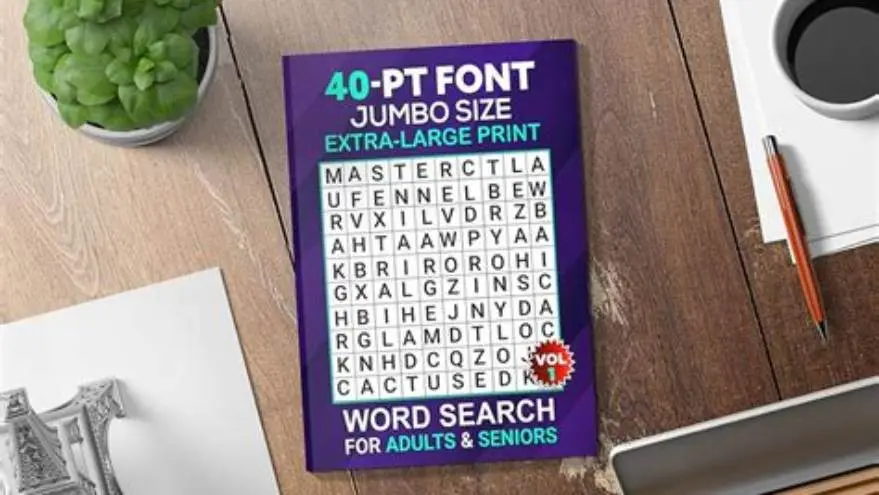
BigPrint Puzzle Studio is the best tool for making large-print puzzle books designed for seniors, generating KDP-ready files easily with print sizes from 16 to 24 points and themed puzzles, all in one place.
On this page (8 sections)
- Key takeaways
- Why large-print puzzles matter for seniors
- How puzzle maker software handles large-print creation
- Exporting puzzle books for Amazon KDP
- Comparing costs and ease of use for puzzle book software
- How puzzle generation quality varies by software
- Best puzzle book maker software for KDP: BigPrint Puzzle Studio
- Questions people still ask
Part of our guide on how to create large print puzzles kdp
See which software truly supports large-print puzzles and KDP formatting so you can make seniors’ puzzle books that sell.
| Minimum font size | 16 pt |
|---|---|
| Puzzle types | Word search, sudoku, others |
| KDP-ready export | Yes, with margin support |
| Price model | One-time payment |
| Usage limit | Up to 3 computers |
Key takeaways
- Large-print puzzles require font sizes of at least 16 pt for seniors' readability.
- Puzzle quality and variety affect engagement; tools differ in types and themes offered.
- KDP export options vary; true big-print software simplifies margin and format compliance.
- Cost structures range from free but manual methods to one-time payments for dedicated software.
- Usability is crucial; complex tools create barriers for non-tech users making puzzle books.
Why large-print puzzles matter for seniors
Font sizes of 16 pt or larger are essential for older adults, especially those with visual impairment or memory challenges. Smaller print increases eye strain and reduces engagement.
Large-print puzzle books require clear layouts with sufficient spacing. Puzzle complexity should be balanced to maintain interest without causing frustration.
Activity directors and family caregivers often search for puzzles that are both readable and stimulating. This means word sizes, grid spacing, and answer keys must meet specific criteria.
Puzzle makers without big-print support force users to manually adjust type sizes and layouts, increasing production time and risk of errors. Before you commit to anything, it is worth looking at how to make a sudoku book to sell on amazon.
Large-print puzzles also help maintain cognitive function in seniors by reducing the obstacles posed by small fonts. When font size drops below 16 pt, seniors often experience slower puzzle solving and increased errors, which can discourage continued use. In contrast, puzzles printed in 18-20 pt font strike a balance between readability and challenge, keeping users engaged longer.
Another factor to consider is the typeface used in large-print puzzles. Sans-serif fonts such as Arial or Verdana enhance legibility more than serif fonts, especially at sizes above 16 pt. Puzzle makers that allow font customization to select clear, easy-to-read typefaces further improve accessibility for seniors with mild vision impairments.
How puzzle maker software handles large-print creation
Not all puzzle book creation software supports setting font sizes to 16 pt or above. Many general puzzle generators produce standard print sizes around 10-12 pt. It helps to understand acrostic puzzle creator with large print before going further.
BigPrint Puzzle Studio offers large-print options explicitly, letting you choose 16, 20, or 24 pt fonts. This saves time compared to resizing puzzles manually in graphic software.
Software designed for seniors’ puzzles often includes ready themes and custom word lists optimized for bigger print and clearer grids. This helps ensure the puzzles are both suitable and engaging.
While some tools require complex formatting workflows, dedicated large-print puzzle makers streamline the process with automatic layout adjustments for readability. We go through what does bigprint puzzle studio do step by step elsewhere on the site.
Some advanced puzzle maker software includes adaptive layout features that automatically adjust grid sizes and clue spacing based on the font size selected. For example, if you choose 20 pt font, the software can expand the puzzle grid and increase cell padding to prevent overcrowding. This automatic scaling is critical because simply enlarging font without adjusting the grid can cause puzzles to become visually cluttered or spill over page margins.
Certain puzzle makers also provide preview modes that simulate how a puzzle will appear when printed in large print. This allows creators to identify layout issues before exporting. For instance, a 24 pt font crossword might require fewer clues per page to maintain readability, and previewing helps set these limits appropriately.
| Software | Min Font Size | Puzzle Themes | Custom Word Lists | Layout Automation |
|---|---|---|---|---|
| BigPrint Puzzle Studio | 16 pt | 42 ready themes | Yes | Automatic for big print |
| Generic puzzle maker | 10-12 pt | Few or none | Rare or none | Manual only |
| DIY templates | Variable | User defined | User defined | Depends on user skill |
- Built-in big-print sizes
- Pre-set puzzle themes
- Automatic layout for readability
- Limited to activity puzzles
- No medical or diagnosis features
- One-time payment needed
Exporting puzzle books for Amazon KDP
Amazon KDP requires specific margin and bleed settings that many generic puzzle tools do not handle automatically. We cover designing for older adults in its own article.
BigPrint Puzzle Studio generates puzzles formatted to KDP’s margins and page sizes, ready for upload without further adjustment.
PDF export quality is crucial; puzzles must remain sharp and readable once printed. Some software outputs lower-resolution files unsuitable for publishing.
Manual export methods using word processors or design software involve setting margins and page size yourself, which often leads to layout errors or cut-off content. For the detail, see our notes on how to make a word search book without canva.
In addition to margin and bleed settings, Amazon KDP requires PDFs to be created at a resolution of at least 300 dpi to ensure print clarity. Some puzzle book software compresses PDFs too much, resulting in pixelated puzzles that frustrate users. BigPrint Puzzle Studio maintains high resolution during export, preserving sharp lines and text.
KDP also demands embedded fonts within PDFs to avoid font substitution during printing. Software that exports with embedded fonts ensures the large-print fonts appear exactly as designed. Users who export puzzles as images or from non-specialized software may encounter font replacement issues, degrading puzzle readability.
Comparing costs and ease of use for puzzle book software
Free tools and templates exist but usually require significant manual work to resize print and format for KDP. This can take hours per book for beginners. People in this spot often ask about kdp puzzle book font size for seniors as well.
BigPrint Puzzle Studio has a one-time cost and no monthly fees, which is cost-effective if you plan to make multiple books.
Ease of use is essential for those not comfortable with graphic design or puzzle creation. Complex software or manual methods increase frustration and errors.
Some sellers combine free puzzle generators with paid layout software, but this fragmented process costs more in time and effort than a single dedicated tool.
While free puzzle software may appear attractive, the time investment to manually resize puzzles, reformat pages, and prepare files for KDP can exceed 10 hours for a single book novice creators. By contrast, BigPrint Puzzle Studio users report completing entire puzzle books within 2 to 3 hours.
The one-time purchase price of BigPrint Puzzle Studio typically ranges between $40 and $60 depending on sales and promotions, which is economical given the time saved and features gained. This contrasts with monthly subscriptions for some puzzle design suites that can add up to $200+ annually without large-print support.
For those unfamiliar with graphic design tools like Adobe InDesign or Affinity Publisher, BigPrint Puzzle Studio offers an intuitive interface with step-by-step wizards. This reduces common errors such as misaligned grids or inconsistent font sizes, which otherwise waste time during revisions.
| Method | Cost | Time to Create | Technical Skill Needed |
|---|---|---|---|
| BigPrint Puzzle Studio | One-time ~$17 | Minutes per book | Low |
| Free online generators + manual layout | Free | Hours per book | Medium to high |
| Professional design software | High | Hours to days | High |
- Low upfront cost
- Designed for puzzle books
- Minimal tech skill required
- Limited puzzle types
- Focus on activities, no medical features
How puzzle generation quality varies by software
Puzzle quality depends on the algorithms used and the number of puzzle types offered.
BigPrint Puzzle Studio provides a wide range of puzzle types including word searches, sudoku, and crosswords, all optimized for big print.
Some generic or free puzzle generators produce puzzles with repetitive or uninspired word lists, lowering user engagement.
The software’s ability to generate themed puzzles with custom word lists adds value for sellers aiming at niche markets like holidays or memory care.
Best puzzle book maker software for KDP: BigPrint Puzzle Studio
BigPrint Puzzle Studio fits the need for quickly creating large-print, KDP-ready puzzle books for older adults.
It offers 16 to 24 pt font sizes, 42 puzzle themes, and automatic formatting for Amazon KDP margins, streamlining the entire puzzle book creation and publishing process.
The one-time payment model without monthly fees makes it affordable for regular puzzle book creators.
While it does not cover medical diagnosis or advanced visual accessibility beyond large print, it is highly suited for family caregivers, activity directors, and anyone wanting to make engaging, readable puzzle books for seniors.
- Tailored for large-print puzzles
- Automates KDP formatting
- No subscription fees
- Includes wrap-around cover maker
- Limited to puzzle activities
- No built-in AI or content generation
- Not designed for non-puzzle content
BigPrint Puzzle Studio is the practical choice for creating large-print puzzle books ready for KDP publishing, balancing quality, usability, and cost.
Questions people still ask
Can I make large-print puzzles for free without software?
Yes, you can manually enlarge puzzles created with free generators by copying them into word processors and increasing font size, but this is time-consuming and risks formatting errors.
Does BigPrint Puzzle Studio handle cover design for KDP?
Yes, it includes a wrap-around cover maker designed to fit Amazon KDP specifications, simplifying the publishing process.
Is technical skill required to use specialized puzzle book software?
Most dedicated software like BigPrint Puzzle Studio is designed for ease of use, requiring minimal computer skills, unlike graphic design programs.
Are the puzzle themes customizable?
BigPrint Puzzle Studio offers many ready-made themes and the ability to use custom word lists, which lets you tailor books to niches or interests.
Will using this software guarantee my puzzle book sells well on Amazon?
No software guarantees sales. Selling depends on marketing, niche demand, and book quality. Good puzzle design and readability improve chances but don’t assure success.