Large-print crossword puzzles for seniors
Learn exact font sizes, grid layouts, and theme ideas for printable large-print crossword puzzles tailored for seniors.
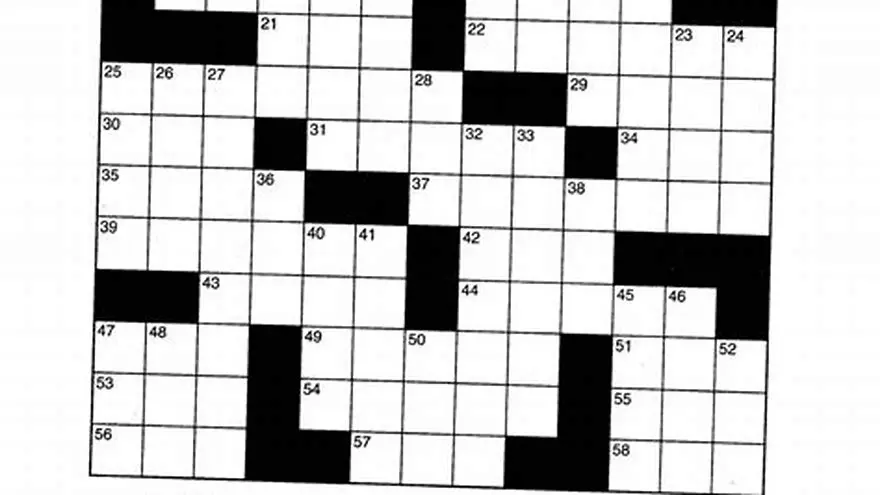
Large-print crossword puzzles for seniors use fonts sized 16-24 points with grid squares around 0.5-0.7 inches per side, clear layouts, and themes like nature or familiar holidays to ensure readability and engagement.
On this page (8 sections)
- Key takeaways
- Ideal font sizes and grid layout for large-print crossword puzzles
- Themed crossword puzzles printable large font for seniors
- Free and easy printable large print crosswords for seniors
- How to create large-print crossword puzzles suitable for seniors
- Using BigPrint Puzzle Studio to make large-print puzzles for seniors
- Where to find and how to pick large print crossword puzzles for seniors
- Questions people still ask
| Font size | 16-24 pt |
|---|---|
| Grid square | 0.5-0.7 inches |
| Theme types | Nature, holidays, familiar topics |
| Printable types | Free and custom |
| Recommended tool | BigPrint Puzzle Studio |
Key takeaways
- Use font sizes between 16-24 pt for clarity.
- Grid squares should be around 0.5-0.7 inches wide.
- Choose familiar and engaging themes suited to seniors.
- Printable large-print puzzles can be created manually or with specialized tools.
- Free printable options exist but may lack customization.
Ideal font sizes and grid layout for large-print crossword puzzles
Crossword puzzles designed for seniors require font sizes that improve legibility without crowding the page. Fonts between 16 and 24 points are generally comfortable for older eyes, depending on the font style and the senior's vision. Serif or sans-serif fonts with clear letterforms help prevent confusion between similar letters.
Grid squares sized at about 0.5 to 0.7 inches (12.7 to 17.8 mm) per side accommodate the large print clues and allow easier pencil or pen use. The overall layout should avoid clutter and maintain clear spacing between clues and the grid.
Contrast is critical: black text on white or off-white backgrounds reduces eye strain. Avoid decorative fonts within the grid or clues as they can reduce readability despite larger size.
- Font style: choose clean serif or simple sans-serif fonts.
- Font size: 16-24 pt depending on senior’s sight.
- Grid size: 0.5-0.7 inch squares for easy writing.
- Spacing: ample margin around the grid and clues.
- Contrast: black on white or cream paper.
Themed crossword puzzles printable large font for seniors
Themes make puzzles more engaging and easier to solve by activating seniors’ existing knowledge. Popular themes include nature, holidays, childhood memories, simple trivia, and familiar locations. These themes avoid obscure clues that may cause frustration. The other half of this decision is how to make large print puzzle books for kdp.
Crossword puzzles with holiday themes (Christmas, Easter) or seasonal topics often boost interest and provide context for memory recall. Nature and animals are also favorites as they use common words and images.
Theme choice should balance challenge with accessibility: overly complex or specialized themes risk disengagement. Simple, warm, and familiar topics support positive experiences.
- Nature: trees, flowers, animals
- Holidays: Christmas, Thanksgiving, Halloween
- Pastimes: gardening, cooking, music
- Locations: hometowns, countries, landmarks
- Memory prompts: childhood games, classic TV
Free and easy printable large print crosswords for seniors
Free large-print crossword puzzles can be found on websites specializing in senior activities and printable games. These usually feature font sizes around 16 pt and simple layouts but may vary widely in design and theme quality. There is more on large-print thanksgiving activities in a separate guide.
To print free puzzles, check puzzle sites for filter options like 'large print' or 'senior friendly'. The downside is less control over exact font size and grid spacing, which may require manual adjustment in a PDF editor.
An alternative free method is to increase the font size in a word processor or PDF viewer before printing. This can help if you find standard puzzles too small but may disrupt layout and cause page breaks.
Beware of puzzles that claim ‘large print’ but use fonts below 14 pt; they are usually not suitable. Also, many free puzzles lack answer keys or numbered pages, making repeated use harder. People in this spot often ask about exact cell and font sizes for crosswords as well.
- Search for ‘large print crosswords’ on senior activity sites.
- Use PDF zoom or font size increase before printing.
- Check grid size manually; 0.5 inch squares minimum.
- Look for puzzles with clear clues and simple themes.
- Verify answer keys are included for self-checking.
How to create large-print crossword puzzles suitable for seniors
Creating your own large-print crosswords lets you control font size, grid layout, and theme selection precisely. Start by choosing a font size between 16 and 24 points to ensure readability, then set grid squares to about 0.6 inches per side.
Choose a familiar theme and create clues using common vocabulary and clear definitions. Avoid overly tricky or ambiguous clues, as seniors often prefer straightforward puzzles that build confidence.
You can create puzzles manually using word processors or spreadsheet software by designing the grid and inserting large text, but this is time-consuming and prone to formatting errors. Before you commit to anything, it is worth looking at word scramble games for seniors.
Specialized puzzle creation software or online tools simplify the process by letting you choose font sizes and themes easily, then outputting professionally formatted puzzles ready to print or distribute.
- Select a readable font (sans- or serif) sized 16-24 pt.
- Design a crossword grid with squares about 0.5-0.7 inches wide.
- Pick a familiar, engaging theme for the puzzle.
- Write clear, simple clues matched to the theme.
- Use software or templates to format the puzzle cleanly.
- Print a test page to verify readability and layout.
Using BigPrint Puzzle Studio to make large-print puzzles for seniors
BigPrint Puzzle Studio is an online tool that streamlines creating large-print crossword puzzles with options for font sizes of 16, 20, or 24 points and grid layouts optimized for seniors. It includes 42 ready-made themes and supports custom word lists, delivering printable puzzles with answer keys and page numbers.
This tool is ideal for activity directors, family members, or anyone making puzzles for seniors who want professional-looking puzzles without complex software or manual formatting. It generates complete puzzle books suitable for print or digital distribution. Before you commit to anything, it is worth looking at acrostic puzzle creator with large print.
One limitation is that it focuses only on puzzles and does not include medical or therapeutic features, meaning it is purely an activity resource. The software requires a one-time payment but offers free updates and a money-back guarantee.
For those hesitant about software, the interface is designed to be user-friendly, with step-by-step guidance to build puzzles quickly.
- Easy to use interface
- Large font sizes ready-made
- Includes themed word lists
- Generates answer keys automatically
- One-time payment required
- No medical or therapeutic features
- Limited to puzzle creation only
Where to find and how to pick large print crossword puzzles for seniors
When selecting large-print crosswords for seniors, prioritize font size, grid layout, and theme familiarity. Puzzles with font sizes under 16 pt or cramped grids are hard to read and discourage use. We go through crossword answers for all levels step by step elsewhere on the site.
Consider the puzzle difficulty: easier puzzles with simple vocabulary and clear clues encourage confidence. Avoid puzzles with tiny fonts, intricate themes, or too many black squares.
Free puzzles can be great but often require scrutiny to verify if they truly meet large-print criteria. Paid or professionally generated puzzles like those from BigPrint Puzzle Studio guarantee consistent readability and layout.
Activity directors should look for puzzles with printable PDF formats including answer keys and page numbers to aid repeated use and tracking progress. Family caregivers may prefer themed puzzles tied to the senior’s interests.
Finally, consider if you want printed copies or digital formats; some seniors prefer physical books while others enjoy tablets.
| Feature | Free Printable Puzzles | BigPrint Puzzle Studio |
|---|---|---|
| Font size control | Limited, varies by source | 16-24 pt selectable |
| Themes available | Varied, often random | 42 pre-made + custom |
| Answer keys included | Sometimes missing | Always included |
| Ease of creating own | Manual, time-consuming | Automated, user-friendly |
| Cost | Free | One-time fee |
Questions people still ask
What is the minimum font size recommended for seniors in crossword puzzles?
The minimum font size generally recommended is 16 points, which balances readability with page layout, though some seniors benefit from fonts up to 24 points.
Are free large-print crossword puzzles reliable for seniors?
Free puzzles vary widely; some have small fonts or poor layout. Always verify font size and print a test page before relying on them.
Can I create printable large-print crosswords without special software?
Yes, using word processors or spreadsheet software is possible but often tedious and prone to formatting errors, especially for font and grid sizing.
What themes work best for seniors in crossword puzzles?
Themes based on familiar topics like nature, holidays, childhood memories, and simple trivia engage seniors better and avoid frustration.
Is BigPrint Puzzle Studio suitable for non-tech users?
The software is designed to be straightforward and user-friendly, but some basic computer skills are helpful. It provides guided puzzle creation.
Ready to try it? It offers easy large-print font selection, themed word lists, and automatic formatting for puzzles geared to seniors.
Create large-print puzzles