Large print word search generator: how to create easy-read puzzles to print
Create large print word searches optimized for seniors by setting font size, improving layout, and customizing word lists.
Set font size between 18-30 points for large print word searches to ensure readability for seniors. Use simple, clean puzzle layouts with wide grids and avoid clutter. Customize word lists for simplicity and thematic clarity. Tools like BigPrint Puzzle Studio automate this process efficiently.
On this page (8 sections)
- The short version
- How to set font size for large print word searches
- Which puzzle layouts improve readability
- Where to find or make printable large print word searches
- How to customize word lists for simplicity
- Large print word search generator options and tools
- How to create large print word searches step-by-step
- Questions people still ask
Part of our guide on large print word search book kdp niche
Create large-print word searches that seniors can read easily with practical font and layout tips plus tools that save hours.
| Font size | 18-30 pt |
|---|---|
| Grid size | 12x12 or less |
| Puzzle types | Word search, sudoku, mazes |
| Printable formats | PDF A4/Letter |
| Creation time | Minutes with software |
The short version
- Use font sizes 18-30 points depending on vision needs.
- Choose puzzle layouts with wide spacing and simple grids.
- Customize word lists for easy, relevant vocabulary.
- BigPrint Puzzle Studio simplifies large print puzzle creation.
- Manual methods are possible but more time-consuming.
How to set font size for large print word searches
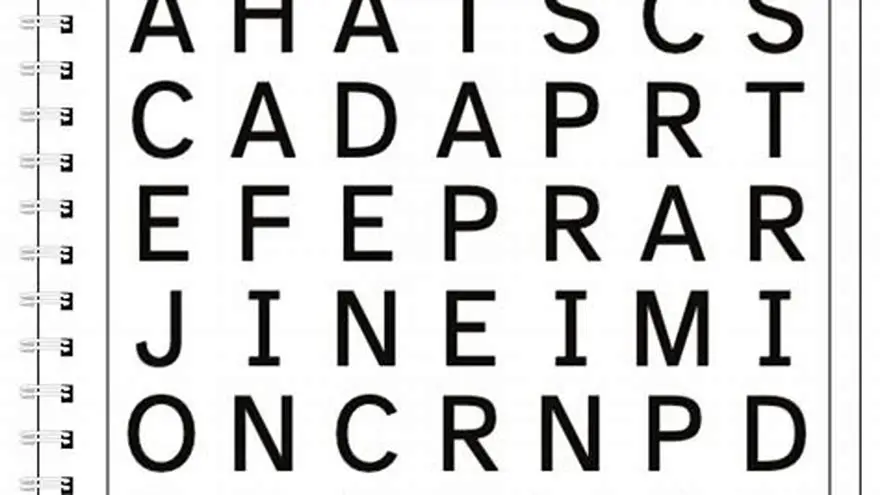
For accessibility, font size is key. Use fonts sized between 18 and 30 points for large print word searches. The exact size depends on the user's vision and reading comfort.
A size under 18 points often strains older eyes, especially with low vision. Sizes above 30 points may cause layout issues, fitting fewer words per page.
Fonts like Arial, Verdana, and Tahoma provide clear, sans-serif letters which are easier to read. Avoid ornate or condensed fonts that reduce clarity.
Ensure consistent letter spacing and use uppercase letters to enhance legibility. Avoid mixing font sizes in the same puzzle. There is more on easy word search for seniors with large print in a separate guide.
If the puzzle is for someone with very limited vision, consider even larger fonts up to 36 points. This reduces the number of words per page but makes each letter easier to see. Use bold font styles to increase contrast without changing the letter shape, which helps letters stand out on the page.
Check printed samples at actual size before finalizing. What looks good on a screen may appear too small or too large when printed. Print a test page and view it from a typical reading distance of about 12 to 18 inches to ensure comfort.
- Improves readability for seniors
- Reduces eye fatigue
- Matches large print standards
- Larger fonts limit puzzle size per page
- May require redesign of puzzle layout
Which puzzle layouts improve readability
Layouts with grids no larger than 12x12 letters are easier to follow. Larger grids create clutter and overwhelm readers. There is more on how to make themed large print word searches in a separate guide.
Use wide spacing between letters and words, at least 1.5 times standard spacing. This prevents letters from appearing cramped.
Horizontal and vertical word placement aids scanning. Avoid diagonal or backward words for simpler puzzles that seniors find less frustrating.
Keep puzzles on clean, uncluttered pages with sufficient margins. Avoid background images or patterns that distract from the puzzle. People in this spot often ask about commercial use word search generator as well.
Line guides or subtle borders around letters can help users track their place.
For extra help, add light shading or alternating row colors in the grid. This visually separates rows and makes tracking easier. But keep colors pale so letters remain clear and no distractions occur.
Use simple borders around the puzzle area and word list to keep focus. Avoid heavy lines or multiple layers of framing which can clutter the page. We cover kdp puzzle generator in its own article.
| Layout Feature | Recommended | Not Recommended |
|---|---|---|
| Grid size | Up to 12x12 letters | More than 15x15 letters |
| Word direction | Horizontal and vertical only | Diagonal and backward words |
| Spacing | 1.5x letter spacing | Tight letter placement |
| Page design | Plain white background, wide margins | Busy backgrounds, small margins |
Where to find or make printable large print word searches
Free resources exist for printable large print word searches, such as the Large Print Word Search Maker, which lets you enter your own word list and generates a PDF puzzle with large letters and an answer sheet.
Manual creation is possible using spreadsheet programs or word processing software by increasing font size and spacing, but this is time-consuming and less precise.
For faster results and professional layouts, BigPrint Puzzle Studio is a web-based platform that creates large print puzzles with customizable themes and formats ready for print or sale on platforms like Amazon KDP and Etsy.
BigPrint Puzzle Studio handles font size, spacing, grid layout, and matching cover design. It costs a one-time fee but saves hours of formatting work.
If you want puzzles themed by difficulty, some sites let you specify the number of intersecting words. Fewer intersections make the puzzle simpler and less confusing.
Look for puzzles that provide a large print answer key on a separate page. This helps users check their solutions without straining to read small answers in the puzzle itself.
Some websites allow downloading puzzles in multiple font sizes. You can pick the best size for your user and print multiple copies to compare.
How to customize word lists for simplicity
Simple, familiar words enhance puzzle success for older adults. Choose words with fewer than 10 letters and avoid obscure vocabulary.
Limit the number of words to between 8 and 15 per puzzle. Too many words make the puzzle dense and harder to read.
Group words by theme (e.g., seasons, animals, hobbies) to add context and make finding words easier.
Remove words with similar spellings or overlapping letter sequences to reduce confusion.
Test your word list by solving the puzzle yourself or asking a senior to try it. Adjust if words feel too complex or the puzzle too cluttered.
Avoid compound words or hyphenated words as they may confuse users visually scanning the grid.
Pick words that don't share many common letters in sequence. For example, 'cat' and 'catch' together can complicate the search. Choose either one or the other.
Group words into themes your audience enjoys, like gardening, holidays, or animals. Familiarity helps users spot words quickly and enjoy the puzzle more.
Large print word search generator options and tools
BigPrint Puzzle Studio is a strong solution for making large print word searches. It automates font sizing, layout, and word list customization while producing print-ready PDFs for Amazon KDP and Etsy.
Its drawbacks: it requires a one-time purchase and learning the interface, but it saves hours compared to manual methods.
The free Large Print Word Search Maker tool creates basic puzzles from your word list with large, clear letters and an answer page. It’s ideal if you want a quick free solution without customization.
Manual creation using word processors is feasible but inefficient for multiple puzzles or books. It demands advanced layout skills and time.
Choose BigPrint Puzzle Studio if you plan to publish or sell multiple large print puzzles with professional polish and time savings.
Some tools let you preview puzzles in different font sizes and layouts before finalizing. Use this feature to test readability and adjust grids or word lists as needed.
Check if the generator supports exporting in several formats like PDF or JPEG. PDFs generally keep layouts stable for printing.
Compare free and paid tools by trying sample puzzles. Note differences in fonts available, grid size options, and how easy it is to customize words and formats.
| Feature | BigPrint Puzzle Studio | Free Word Search Maker | Manual Creation |
|---|---|---|---|
| Cost | One-time fee | Free | Free software |
| Customization | High | Limited | High but labor-intensive |
| Output quality | Professional PDF | Basic PDF | Varies |
| Time investment | Minutes | Minutes | Hours per puzzle |
| Skill needed | Low to medium | Low | High |
- Saves time on design and formatting
- Professional, consistent layouts
- Multiple puzzle types and themes
- Upfront cost
- Learning curve for software
How to create large print word searches step-by-step
Start by choosing your word list carefully. Keep word count and complexity suitable for your audience.
Next, select your font size and type. Use a sans-serif font, 18 to 30 points, and bold if possible.
Set grid size to no more than 12x12 and arrange words horizontally or vertically for ease.
Adjust letter spacing to at least 1.5 times normal to avoid cramping.
Add visual aids like line guides or light row shading if desired.
Generate the puzzle using your chosen tool and print a test page.
Provide an answer key on a separate page, using the same large font for easy reference.
Test the puzzle with your target group and adjust font size, word list, or layout as needed to improve readability and enjoyment.
- Choose a word list of 8-15 simple, themed words under 10 letters.
- Set font size to between 18 and 30 points for clear readability.
- Design puzzle with a grid no larger than 12x12 letters, using horizontal and vertical word placement.
- Space letters at least 1.5 times standard spacing, with wide margins and a plain background.
- Generate or print your puzzle, including an answer key for reference.
- Test the puzzle with intended users and adjust font size or word list complexity if needed.
Questions people still ask
What font size works best for large print puzzles?
Font sizes between 18 and 30 points are best. The exact size depends on the user's vision and comfort.
Can I use free tools to make large print word searches?
Yes, free tools exist but they offer limited customization and may take longer to produce professional results.
How many words should a large print word search have?
Between 8 and 15 words keeps the puzzle simple and readable for seniors.
Are diagonal or backward words suitable for seniors?
Avoid diagonal or backward words, as horizontal and vertical words are easier for older adults to find.
What if I want to publish a large print puzzle book?
Consider using BigPrint Puzzle Studio to quickly create print-ready puzzles and covers formatted for Amazon KDP.
Ready to try it? It streamlines creating large print word searches with correct fonts, layouts, and export-ready files for publishing.
Create large print puzzles fast