Sudoku generator for KDP books: create printable puzzles with solutions
Generate large-print sudoku puzzles with solutions formatted as PDFs, ready for publishing on Amazon KDP puzzle books.
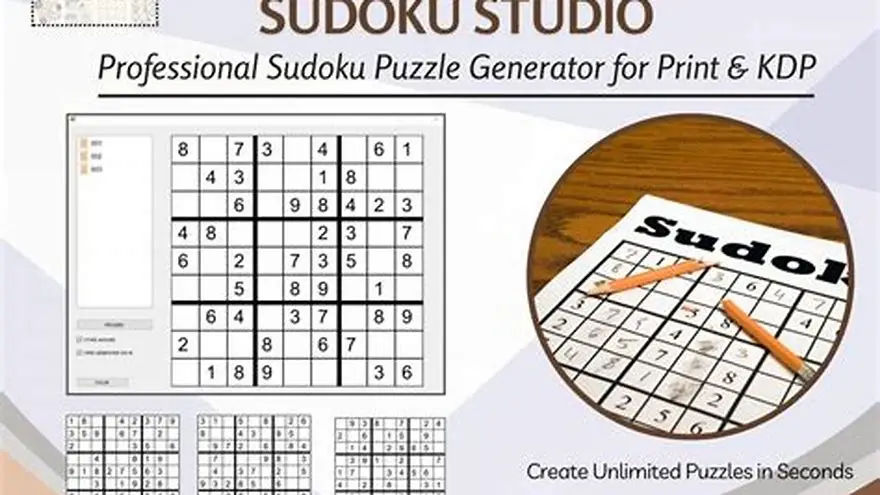
Generate sudoku puzzles suitable for large-print KDP books by using tools that create puzzles with clear grids and large digits, export them as print-ready PDFs including solutions, and follow KDP formatting requirements on page size and margins.
On this page (8 sections)
- The short version
- How to generate sudoku puzzles suitable for large-print KDP books
- How to format puzzles and solutions as printable PDFs
- Tips for KDP puzzle book publishing requirements
- Sudoku generator for KDP books: why BigPrint Puzzle Studio fits best
- Alternative ways to make large-print sudoku puzzles for KDP
- How to generate sudoku puzzles suitable for large-print KDP books
- Questions people still ask
Part of our guide on designing for older adults
Create large-print sudoku puzzles with solutions formatted as PDFs ready for Amazon KDP publishing, tailored for seniors' readability.
| Sudoku grid size | 9x9 cells |
|---|---|
| Digit size for large print | 18-24 pt font |
| KDP trim sizes | 6x9 to 8.5x11 inches |
| PDF output | Print-ready with margins |
| Typical puzzle count | 50-100 per book |
The short version
- Sudoku puzzles for large-print KDP need bigger grids and digits.
- Solutions must be on separate pages formatted as PDFs.
- KDP requires specific trim sizes and margins for print clarity.
- BigPrint Puzzle Studio simplifies creating puzzles and PDFs.
- Manual methods exist but are more time-consuming and complex.
How to generate sudoku puzzles suitable for large-print KDP books
A sudoku puzzle for large-print KDP books must have digits at least 18-24 pt in size to ensure readability for older adults with low vision. The 9x9 grid should have clear, bold lines separating blocks to aid visual clarity.
Generating puzzles manually involves solving and formatting puzzles one by one in a spreadsheet or design software, which is slow and prone to errors. Instead, use a generator that can output puzzles with adjustable font sizes and grid spacing.
Some free online sudoku generators create puzzles but often lack options for large print or exporting puzzles with solutions in a single PDF formatted for KDP trim sizes.
A manual alternative is creating puzzles in Excel or Google Sheets with large fonts and borders, then exporting to PDF, but this requires layout skills and time to format solution pages separately. If that sounds like your situation, read up on creating puzzles for KDP next.
To create suitable puzzles, ensure each puzzle and solution fits well on a page size KDP accepts, usually between 6x9 and 8.5x11 inches, with margins of at least 0.5 inches to avoid printing cutoffs.
- Grid clarity: use thick lines for 3x3 blocks
- Font size: minimum 18 pt for digits
- Puzzle difficulty: test to match target audience
- Puzzle count: plan 50-100 puzzles per book
How to format puzzles and solutions as printable PDFs
KDP requires print-ready PDF files matching the chosen trim size and including margins for binding and cutting. For large-print sudoku books, puzzles and their solutions should be on separate pages for clear user experience.
Format each puzzle page with a grid sized to fill most of the page, leaving margins of at least 0.5 inches. Use consistent font sizes for digits and titles to maintain uniformity across pages. The other half of this decision is how to sell sudoku books amazon.
Solutions pages must show the fully solved grid using the same font size and layout to avoid confusing users. Label solution pages clearly to differentiate them from puzzles.
Generating PDFs manually means combining puzzle images or exported grids with solution pages using PDF editors or word processors, which can be complex and error-prone. Ensuring proper page order and consistent layout takes time.
Many puzzle creators use vector graphics or high-resolution images to keep print quality sharp, especially for the larger fonts and grid lines needed in large-print books. For the detail, see our notes on font recommendations for seniors.
- Trim size: choose 6x9, 7x10, or 8.5x11 inches
- Margins: minimum 0.5 inches on all sides
- Page order: puzzle first, solution next
- Resolution: 300 dpi or higher for print quality
Tips for KDP puzzle book publishing requirements
Amazon KDP requires PDF files that fit specific trim sizes, have bleed or margins set correctly, and use embedded fonts. Large-print puzzle books benefit from a slightly bigger trim size, like 8.5x11 inches, to allow bigger puzzles without crowding.
KDP mandates at least 0.25 inches margin without bleed and 0.125 inches inside for bleed when needed. Large-print books should add larger margins to improve readability and avoid lost content during binding.
File size limits exist; keep PDFs optimized without sacrificing font clarity. Use vector fonts rather than images where possible, or high-quality PNGs at 300 dpi for grids and digits. We go through large-print puzzle makers step by step elsewhere on the site.
Titles, subtitles, and copyright pages must be included and formatted following KDP guidelines. Add page numbering and clear labeling to guide readers through puzzles and solutions easily.
Testing print proofs is essential to confirm font sizes, margins, and grid visibility before final publishing. Poor formatting can lead to reader frustration and negative reviews.
- Trim sizes: 6x9, 7x10, 8.5x11 inches
- Margins: at least 0.5 inches for large print
- Proof print: order physical sample before publishing
- Fonts: embed all fonts in PDF
- File size: keep below 650 MB for KDP
Sudoku generator for KDP books: why BigPrint Puzzle Studio fits best
BigPrint Puzzle Studio is a web-based tool designed specifically to create large-print puzzle books quickly, including sudoku puzzles with solutions formatted as print-ready PDFs for KDP. Its user interface lets you adjust print size, grid thickness, and font size to suit older adults’ needs.
You can generate unlimited puzzles with several difficulty levels and export them in KDP trim sizes from 6x9 to 8.5x11 inches. The software also produces matching solution pages automatically, saving hours of manual work formatting and compiling PDFs.
BigPrint Puzzle Studio includes customization themes to make puzzles visually appealing and readable, with large, clear digits and robust grids. It also creates Amazon KDP wrap-around covers and helps with listing titles and keywords.
Its biggest advantage is saving time and reducing technical hassle. However, it requires a $17 one-time payment and does not guarantee sales, as success depends on your publishing and marketing efforts.
For sellers focused on big-print KDP puzzle books, it covers all steps from puzzle generation through to print-ready PDF export, making it the most practical choice.
- Generates large-print sudoku puzzles quickly
- Creates print-ready PDFs with solutions
- Customizable grid and font sizes
- Automatic Amazon KDP cover creator
- Costs $17 one-time payment
- No guaranteed income from sales
- Requires user publishing effort
Alternative ways to make large-print sudoku puzzles for KDP
If you prefer a free or manual approach, you can create sudoku puzzles using online free generators that export puzzles as images or text. Then, import these puzzles into a word processor or design software like Microsoft Word or Canva with large fonts and grids.
Manually format each puzzle and solution page to match KDP's trim size and margins. This method requires time to ensure consistency, plus some skill in page layout to avoid formatting problems.
Another alternative is using spreadsheet software, building grids with cell borders, typing in digits with large font sizes, and exporting to PDF. Solutions must be created separately.
Free tools rarely support batch puzzle generation or automatic solution pages, so expect to spend hours compiling a full book.
This approach suits those who want to avoid upfront purchase costs and have more control, but it trades off time and layout complexity.
How to generate sudoku puzzles suitable for large-print KDP books
Generating sudoku puzzles for large-print KDP books means starting with clear grids and font sizes that older adults can read easily. Puzzles need well-defined 3x3 block lines and digits sized between 18 and 24 points, depending on your chosen trim size.
Set your trim size early, typically 8.5x11 inches or 7x10 inches, to allow enough space. Use puzzle creation tools that let you adjust grid and font size, avoiding puzzles that look cramped or too small.
Test print a sample puzzle to check readability before generating dozens. Puzzle difficulty should be balanced: not too hard to frustrate seniors, but challenging enough to engage them.
Maintain consistent styling across all puzzles and solution pages to avoid confusion. Multiple puzzles can be generated with varied difficulty levels and layouts to appeal to a broader audience.
If you are coding your own generator or using scripts, focus on exporting puzzles in a format that supports large fonts and clear grids, like scalable vector graphics or high-resolution PDFs.
Questions people still ask
Can I create large-print sudoku puzzles for free?
Yes, free sudoku generators exist but often lack options for large print and batch PDF export with solutions. Manual formatting is needed, which can be time-intensive.
What font size is best for large-print sudoku books?
Digits sized between 18 and 24 points work well, depending on page trim size and grid layout, to ensure readability for older adults.
How do I ensure my sudoku book meets KDP requirements?
Use the correct trim size (6x9 to 8.5x11 inches), include margins of at least 0.5 inches, embed fonts in PDFs, and include separate solution pages.
Is it necessary to include solutions in a sudoku puzzle book?
Yes, providing solutions on separate pages helps users check their answers and improves reader satisfaction.
How many sudoku puzzles should a typical KDP book have?
Most successful books have between 50 and 100 puzzles, balancing variety and book length.
Can I use BigPrint Puzzle Studio on multiple devices?
Yes, the license allows installation on up to three computers for your own use.
Ready to try it? It directly generates large-print sudoku puzzles and solutions as KDP-ready PDFs, saving time and ensuring proper formatting.
Create large-print Sudoku PDFs