Bible word search puzzles: how to format large-print books for KDP
Create and format large-print Bible word search books for Amazon KDP with the right dimensions, fonts and export settings.
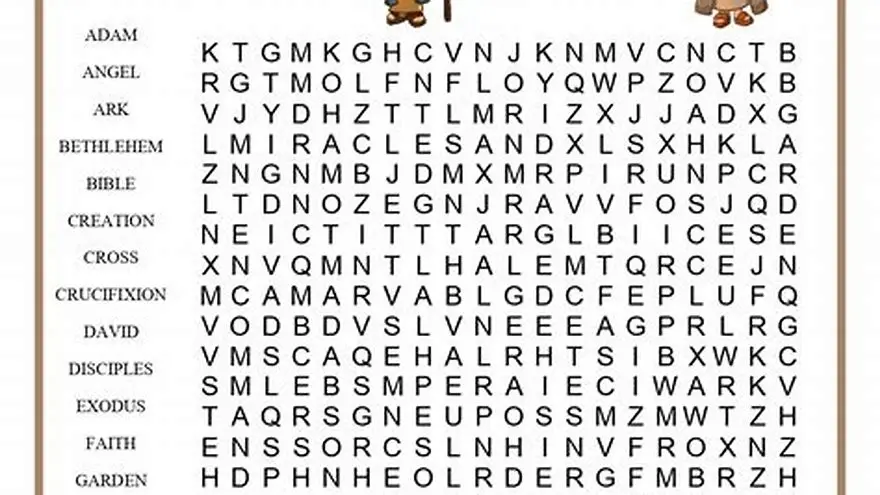
Set your document to 8.5 × 11 inches with 0.5-inch margins, use Verdana or Arial at 18-20 pt for the grid, export as PDF/X-1a:2001, and upload the interior PDF plus a wraparound cover to KDP. Puzzles need 15 × 15 grids or smaller for large print.
On this page (8 sections)
- The short version
- Page dimensions and margins that KDP accepts
- How to choose Bible words and themes for puzzles
- How to create word searches in large print for bible word search book kdp
- How to format puzzles and solutions for KDP
- How to export and upload files to KDP
- Tips for designing puzzles for older adults
- Questions people still ask
Part of our guide on kdp large print word search
Most Bible word search books fail KDP's first upload because the margins, bleed and PDF export settings don't match what print-on-demand actually needs.
| Page size | 8.5 × 11 inches (US Letter) |
|---|---|
| Margins | 0.5 inches all sides |
| Grid size | 15 × 15 letters maximum |
| Font size | 18-20 pt for grid letters |
| PDF format | PDF/X-1a:2001, fonts embedded |
| Minimum page count | 24 pages for KDP paperback |
| Cover type | Wraparound PDF, spine width varies |
The short version
- Use 8.5 × 11 inch pages with 0.5-inch margins on all sides for KDP paperback printing
- Keep Bible word search grids to 15 × 15 letters maximum, with 18-20 pt sans-serif fonts
- Export as PDF/X-1a:2001 with fonts embedded and no security settings
- Group puzzles by theme (Old Testament characters, parables, psalms) and place solutions at the back
- Upload a separate wraparound cover PDF that includes front, spine and back at exact dimensions KDP specifies
Page dimensions and margins that KDP accepts
Amazon KDP prints large-print puzzle books as paperbacks, and the trim size you pick controls everything downstream. 8.5 × 11 inches is the most popular choice for Bible word searches aimed at older adults because it gives you room for a readable grid without forcing tiny letters. KDP also offers 8 × 10 inches, but the extra inch in both directions makes a noticeable difference when your reader has low vision or holds the book under a lamp.
Set your inside margins to 0.5 inches on all four edges. KDP does not require bleed for black-and-white interiors, so a half-inch safe zone keeps text and grids away from the cut line. If you set margins narrower than 0.4 inches, KDP's preflight check flags the file and you cannot proceed to proof. The gutter (the inside margin where pages bind) needs the same 0.5 inches because glue binds the spine and pulls a few millimeters into the page.
Your document setup in Word, Google Docs or a layout program should show 8.5 inches wide by 11 inches tall, with top, bottom, left and right margins all at 0.5 inches. That leaves a 7.5 × 10 inch live area for your puzzle grid, title and instructions. Check the margin ruler before you build the first puzzle; fixing it later means repositioning every grid by hand.
KDP paperback printing uses a web press that trims each book after binding, so dimensional consistency matters more than it did with desktop printers. A puzzle that sits 0.3 inches from the edge on page five and 0.6 inches on page six looks unfinished, and readers assume the whole book is sloppy. Use guides or a master page template so every puzzle lands in the same spot. Before you commit to anything, it is worth looking at designing puzzles for christmas.
How to choose Bible words and themes for puzzles
A strong Bible word search book groups puzzles by theme rather than mixing random words across pages. Themes let readers choose puzzles that interest them and give your book a structure that feels intentional. Popular themes include Old Testament characters (Abraham, Moses, Esther), New Testament parables (prodigal son, good Samaritan), books of the Bible, fruit of the Spirit, and psalms. Each theme fills one puzzle, and you move to a new theme on the next page.
Pick 10 to 15 words per puzzle when you are targeting older adults. Fewer words mean a smaller grid, which lets you use larger letters. A 15 × 15 grid holds up to 15 words comfortably if you allow words to share letters at intersections, the way a crossword does. Avoid obscure names like Mahershalalhashbaz or places like Kirjathjearim unless your audience is advanced Bible students; most readers want familiar terms they recognize from weekly services.
Write out your word list for each puzzle before you build the grid. Include the theme at the top of the page ("Women of the Bible" or "Miracles of Jesus") and print the word list below the grid so readers know what to hunt for. Alphabetical order makes the list easier to scan, and you can bold or italicize words once they are found if you are creating a companion answer key. People in this spot often ask about make word searches with your words as well.
Vary difficulty across the book by changing how words hide in the grid. Early puzzles use only horizontal and vertical placements, while later ones add diagonals and backward words. You do not need to announce the difficulty level on each page, but a gradient from simple to complex keeps beginners engaged and gives confident solvers a challenge near the end. Avoid placing words in shapes or curves; older adults with vision loss rely on straight lines.
- Old Testament: patriarchs, judges, kings, prophets, creation, exodus
- New Testament: apostles, parables, Beatitudes, epistles, resurrection
- Topical: prayers, hymns, covenants, commandments, virtues, armor of God
- Seasonal: Christmas (nativity, shepherds, magi), Easter (cross, tomb, risen)
How to create word searches in large print for bible word search book kdp
Use 18 to 20 pt letters in a sans-serif font so letters stay distinct. Verdana, Arial and Tahoma work. Avoid serif faces like Times New Roman on cream paper under indoor light.
Fit a 15 × 15 grid on an 8.5 × 11 page with 0.5-inch margins and still use 18 pt type. For readers with macular degeneration use a 12 × 12 grid, raise type to 20 or 22 pt, and add more white space. The other half of this decision is large print word search generator.
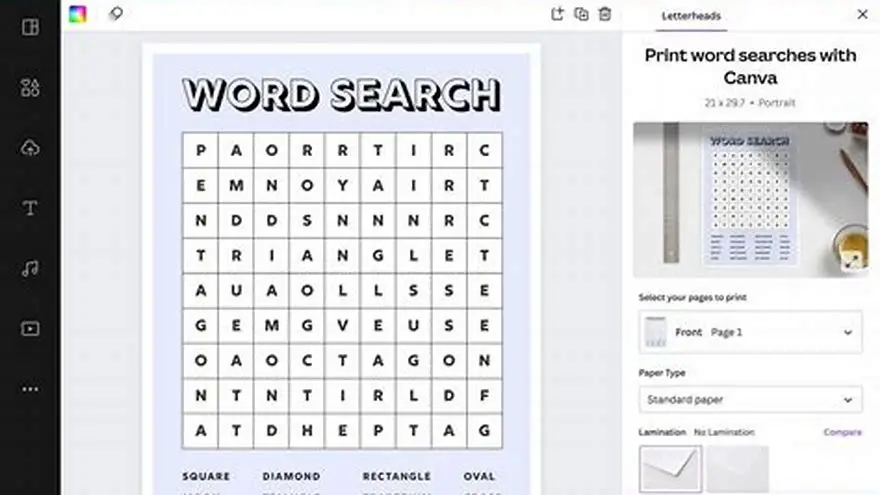
Build grids in Excel or Google Sheets. Make cells square by setting equal row height and column width. Type one letter per cell, add borders and use your chosen font at the final point size. Hide words horizontally, vertically or diagonally. Fill blanks with random letters and avoid accidental words.
Make a test puzzle on your home printer. Hold it at arm’s length under normal room light. If letters blur or you have to lean in, increase the type or shrink the grid. Apply the same settings to every puzzle once the test passes.
How to format puzzles and solutions for KDP
KDP needs a single interior PDF with pages in reading order: title page, optional intro, puzzles, then solutions. Front matter counts toward the 24-page minimum for paperback. If that sounds like your situation, read up on creating large print themed word searches next.
Number each puzzle so readers can match it to the solution. Place puzzles in themed sections or a single sequence. Keep each puzzle centered in the live area and leave room for a title above and the word list below.
Place all solutions at the back in the same order. Mark answers clearly by circling or highlighting words on the grid. You may reduce solution type to 12 or 14 pt to fit two per page, but keep each solution legible.
Export the interior as a PDF with fonts embedded and no security. Check each page in a PDF reader before upload. Word processors can shift text boxes or floating images during export; confirm grids stayed aligned. If that sounds like your situation, read up on seniors large-print book ideas next.
- Create a title page with book name, author and optional graphic
- Add an introduction page explaining how to solve the puzzles
- Insert puzzles in themed sections, numbered sequentially
- Leave blank pages between puzzles if you want each on a right-hand page
- Place all solutions at the back, in the same order as puzzles
- Export as PDF with fonts embedded and no security settings
How to export and upload files to KDP
Export the interior as PDF/X-1a:2001 when your software supports it. That format embeds fonts, flattens transparency and stabilizes color. If PDF/X is unavailable, export a standard PDF and verify fonts are embedded in a PDF reader.
Create a wraparound cover PDF with front, spine and back in one image. Use KDP’s cover calculator. For an 8.5 × 11 book of 50 pages on white paper the spine is about 0.132 inches. Total cover width equals 8.5 + 0.132 + 8.5 = 17.132 inches. Add 0.125-inch bleed on all edges for final canvas 17.382 × 11.25 inches.
Upload the interior PDF first. KDP runs an automated preflight. Review every page in the online previewer and check the gutter near the spine. Then upload the cover PDF. Download the print-ready proof PDF and inspect the spine placement.
Order a physical proof copy and inspect it under good light. Expect to pay about $3 to $5 depending on page count. Check cut alignment, print clarity and black ink density. Approve the proof to publish or revise files and order another proof.
- Interior: PDF/X-1a:2001, fonts embedded, no security, same page count as planned
- Cover: wraparound PDF at exact template dimensions, 300 dpi, 0.125-inch bleed
- Preflight: wait for automated check, review every page in the online previewer
- Proof copy: order a printed book, inspect it under good light, approve or revise
Tips for designing puzzles for older adults
Older adults with low vision or early memory loss need high contrast between the letters and the background. Black letters on white or cream paper work best; avoid gray text, pastel backgrounds or decorative patterns behind the grid. Cream paper reduces glare under bright light and costs the same as white on KDP, but white paper delivers slightly sharper letter edges. Test both in a proof if you are unsure.
Leave whitespace around the grid so the page does not feel crowded. A puzzle that fills every inch of the live area looks dense and intimidating, especially to a reader who tires quickly. Place the title and theme name at the top with a quarter-inch gap below it, center the grid, and position the word list a quarter-inch below the grid. If you have room, add a small cross or vine graphic in one corner, but keep it faint (20 to 30 percent gray) so it does not compete with the letters.
Print the word list in 14 to 16 pt type, slightly smaller than the grid but still large enough to read without glasses. Alphabetical order helps readers track which words they have found, and you can include checkboxes next to each word if you want to encourage marking progress. Avoid all-caps word lists; sentence case or title case is faster to read because ascending and descending letters give each word a recognizable shape.
Older readers often solve puzzles with a pencil first, then go over found words with a highlighter or colored pen. Make sure your grid letters are bold enough that a highlighter does not obscure them. If you are using a weight slider in your software, set the font to regular or medium rather than light. Some sans-serif fonts like Helvetica Neue Light look elegant on screen but print too faint for puzzles.
Include a short note on the introduction page that invites readers to take breaks, skip hard puzzles and return to the book whenever they like. Older adults, especially those with memory changes, appreciate permission to use the book at their own pace without pressure. A single encouraging sentence ("These puzzles are for enjoyment, not a test") removes anxiety and makes the book more welcoming.
| Element | Best choice | Why it matters |
|---|---|---|
| Grid font size | 18-20 pt sans-serif | Distinct letters, no eyestrain under room lighting |
| Grid size | 15 × 15 or smaller | Fits the page with large font and margins |
| Contrast | Black on white or cream | Easier to see for readers with cataracts or macular degeneration |
| Word list size | 14-16 pt sentence case | Readable without glasses, faster to scan than all-caps |
| Whitespace | 0.25 inch around grid | Reduces visual clutter and makes page feel approachable |
Questions people still ask
Can I use color in a large-print Bible word search book for KDP?
You can, but it raises the printing cost significantly and most older adults do not need it. KDP charges per page for color interiors, and a 50-page color book costs more to print than a 100-page black-and-white one. Stick with black letters on white or cream unless you are targeting children or selling the book at a premium price.
How many puzzles should a Bible word search book have?
Most successful large-print books have 40 to 100 puzzles, which translates to 80 to 200 pages when you include solutions and front matter. Readers expect enough content to justify the price, and books under 30 puzzles feel thin. Start with 50 puzzles if you are publishing your first book; you can add a second volume later if it sells.
Do I need an ISBN to publish a word search book on KDP?
No. KDP assigns a free ISBN to every paperback automatically, and you can publish without buying your own. If you want to distribute the book outside Amazon (through bookstores or libraries) you need a purchased ISBN, but most large-print puzzle books sell only on Amazon.
What is the best paper type for older adults, white or cream?
Cream paper reduces glare and is gentler on the eyes for readers who solve puzzles under bright lamps. White paper gives slightly sharper letter edges, which can matter for readers with severe vision loss. Order a proof of each and compare them under the lighting your readers typically use.
Can I sell the same puzzle book on Etsy as a printable?
Yes, but you need to export individual puzzle pages as separate PDFs or high-resolution images rather than a full book file. Etsy buyers expect printables they can download and print at home, so the formatting is different from KDP. You can reuse the same puzzles and solutions, but package them as a ZIP file with one puzzle per PDF.
Ready to try it? It generates large-print Bible word search grids from your word lists and exports print-ready PDFs formatted for KDP, eliminating the manual layout work.
Build your book with it