Large print puzzle books for KDP: font sizes, layout, and formatting steps
Exact font sizes, layouts, and KDP formatting steps to create large print puzzle books that sell.
Use fonts sized between 16 and 24 points with clear sans-serif styles; enlarge puzzle grids by 25-40% for readability; choose 8.5"x11" trim size for best KDP compatibility; submit PDFs at 300 dpi with KDP margins. This ensures puzzles are easy to see and print.
On this page (8 sections)
- Key takeaways
- What font size and style to use for large print puzzles
- How to adjust puzzle grids for large print readability
- Recommended KDP trim sizes for large print puzzle books
- File format and resolution requirements for KDP
- Basic steps to create and upload puzzle books on KDP
- How to make large print puzzle books for KDP using BigPrint Puzzle Studio
- Questions people still ask
Exact font sizes, puzzle grid adjustments, and KDP formatting steps to make large print puzzle books readable and ready to sell on Amazon.
| Font size range | 16-24 pt |
|---|---|
| Puzzle grid increase | 25-40% larger |
| Recommended trim size | 8.5 x 11 inches |
| KDP resolution | 300 dpi |
| PDF file format | Required |
| BigPrint Puzzle Studio | One-time payment tool |
Key takeaways
- Use at least 16 pt font; 20-24 pt preferred for seniors
- Increase puzzle grid sizes by about 30% to improve clarity
- 8.5"x11" trim size is recommended for large print puzzle books on KDP
- Submit PDF files with 300 dpi resolution and KDP margin requirements
- BigPrint Puzzle Studio simplifies large print puzzle book creation
What font size and style to use for large print puzzles
Large print puzzle books designed for older adults require fonts that are comfortably readable without straining the eyes. Fonts between 16 and 24 points are typical, with 20 or 24 points being ideal for most users who have mild to moderate vision loss.
Choose sans-serif fonts like Arial, Verdana, or Tahoma because their clean lines reduce visual clutter. Avoid decorative or script fonts as these can confuse readers or slow down puzzle-solving.
The chosen font size should apply both to the puzzle clues and the puzzle grids’ letters or numbers. For grids, avoid font sizes smaller than 16 pt; bigger is better but must fit on the page without overcrowding.
How to adjust puzzle grids for large print readability
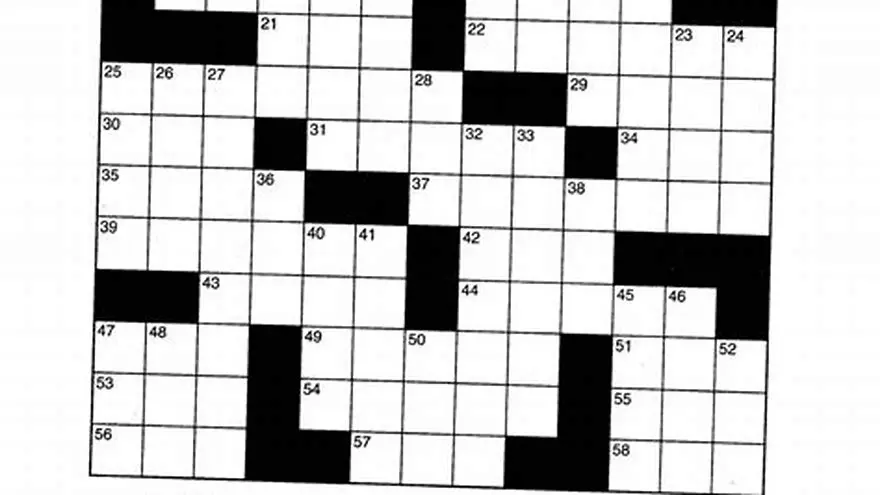
Puzzle grids need to be enlarged by approximately 25% to 40% compared to standard sizes to ensure each square is spacious enough for the large font. For example, if a typical crossword grid is 15x15 squares at 0.25 inches per square, increase to 0.35 inches or more per square. We cover large print crossword puzzles for seniors in its own article.
Spacing around grid borders and numbering must also increase proportionally to prevent crowding. Ensure the grid does not cramp the puzzle clues page or cause awkward page breaks.
Adjusting grids manually in programs like Adobe InDesign or Microsoft Word can be tedious. Many puzzle creators use software tools that automatically scale grids and fonts while maintaining layout balance.
When enlarging puzzle grids, consider the balance between legibility and the total number of puzzles that fit in your book. For example, increasing the square size to 0.4 inches for a 15x15 crossword grid results in a grid roughly 6 inches wide, leaving ample room for clue text on an 8.5x11 page. However, pushing beyond 0.45 inches per square may make the grid too large to fit alongside clues, requiring creative layout solutions such as multi-page puzzles or partial clue lists. If that sounds like your situation, read up on readability tips for seniors next.
For number puzzles like Sudoku or Kakuro, larger cells improve user experience similarly, but each puzzle type has unique spacing needs. Sudoku grids often use 9x9 squares, so increasing cell size from 0.25 inches to 0.35 or 0.4 inches enhances readability without undue page count increase. Testing print proofs at actual size helps verify that numbers remain sharp and easy to input.
If you plan to include answer keys, these also require font size adjustments consistent with puzzles. Answer grids should mirror the puzzle grids’ font and cell size for clarity. Positioning answer keys on separate pages or at the book’s end helps maintain uncluttered puzzle pages. Double-check alignment and spacing during proofing to avoid cramped or misaligned print results.
Recommended KDP trim sizes for large print puzzle books
Amazon KDP supports many trim sizes, but for large print puzzle books, 8.5 x 11 inches is the best choice. This size offers plenty of space for larger fonts and bigger grids without shrinking content or forcing excessive page counts. It helps to understand large print word search book kdp niche before going further.
Smaller trim sizes like 6x9 inches will restrict font and grid sizes, defeating the purpose of large print. Larger sizes are possible but can increase printing costs and reduce portability.
Always check KDP’s current guidelines for trim size compatibility and margin settings before finalizing your book layout to avoid submission errors.
The 8.5 x 11-inch trim size is also advantageous because it aligns with common office paper sizes, facilitating home printing if buyers prefer physical copies outside Amazon. This compatibility supports users who might print individual puzzles for convenience. The other half of this decision is kdp large print activity book.
For books exceeding 150 pages, KDP’s binding requires additional gutter margin (often around 0.375 to 0.5 inches) on the inner edge to prevent loss of content near the spine. Accounting for this while laying out puzzles and clues ensures no vital information disappears into the binding.
While 8.5 x 11 inches is the preferred trim size, some creators experiment with larger formats like 8.5 x 14 inches (legal size) to accommodate exceptionally large fonts or complex puzzles. This increases printing costs and may reduce portability, so evaluate trade-offs before selecting larger dimensions. Always update your PDF margins to comply with KDP specifications for larger trim sizes.
| Trim Size | Suitability for Large Print | Printing Cost Impact | Page Count Impact |
|---|---|---|---|
| 8.5 x 11 inches | Excellent - ample space | Moderate | Standard |
| 6 x 9 inches | Not recommended - cramped | Lower | May increase pages |
| 8 x 10 inches | Good - slightly less space | Moderate | Slightly more pages |
File format and resolution requirements for KDP
KDP requires puzzle book files to be uploaded in PDF format with a minimum resolution of 300 dpi to ensure crisp print quality. Lower resolutions cause blurred or pixelated puzzles, making them harder to read. It helps to understand layout tips for kdp books before going further.
Files must include appropriate margins and bleed settings per KDP specifications. Margins typically range from 0.25 to 0.5 inches, with extra gutter space for bound books over 150 pages to prevent content loss near the spine.
You can create PDFs using word processors, layout programs like Adobe InDesign, or dedicated puzzle book software. Always preview your PDF on screen at 100% zoom to catch any formatting issues.
When creating your PDF, verify that all fonts are embedded to prevent substitution during printing. Embedded fonts ensure that the chosen typeface and size are preserved exactly as designed, maintaining puzzle clarity.
Color mode should be set to grayscale or black and white unless your puzzle includes color elements. Using RGB color profiles can cause unexpected color shifts in print; converting to CMYK or grayscale before exporting helps maintain visual consistency.
A common pitfall is failing to check the PDF at 100% zoom and printing a test page on paper before final upload. This catch errors such as blurry images, incorrect margins, or font sizes that appear smaller than expected. A physical print check is the final quality assurance step before submission.
Basic steps to create and upload puzzle books on KDP
First, design your puzzles with large print fonts and enlarged grids in a layout program or puzzle software. Arrange puzzles and clues with consistent spacing and page breaks.
Export your finished book as a high-resolution PDF with KDP-compatible trim size and margin settings. Use KDP’s free previewer tool to check formatting before upload.
Create a KDP account, enter your book details (title, description, keywords), upload the PDF interior and cover files, and set pricing and distribution options.
After submission, KDP reviews your files for compliance—this takes up to 72 hours. If approved, your large print puzzle book becomes available for sale on Amazon.
- Choose puzzle types and create puzzles with large print settings.
- Format puzzles and clues on pages sized 8.5 x 11 inches.
- Export to 300 dpi PDF with KDP margins and bleed.
- Login to KDP and enter book metadata.
- Upload interior and cover PDFs.
- Submit for review and publish once approved.
How to make large print puzzle books for KDP using BigPrint Puzzle Studio
BigPrint Puzzle Studio streamlines large print puzzle book creation by providing ready-made templates with font sizes from 16 to 24 pt and automatically enlarged grids. It generates KDP-ready PDFs with correct trim size and margin settings.
Users can select from over 42 themed puzzles, customize word lists, and include answer keys and page numbers without manual formatting or design skills.
The studio includes a wrap-around cover maker and helps prepare listings for Amazon, saving hours compared to DIY methods. However, it focuses solely on puzzle creation and does not handle marketing or sales management.
An alternative free approach is using Microsoft Word or Google Docs to manually enlarge fonts and grids, but this is time-consuming and error-prone when formatting for KDP submission.
- Saves time with automatic large print formatting
- Includes puzzle templates and themes
- Generates KDP-ready PDFs with margins
- One-time payment, no monthly fees
- Limited to puzzle creation only
- Not a marketing or sales tool
- Requires some basic computer skills
Questions people still ask
Can I use any font for large print puzzles?
No, use clear sans-serif fonts like Arial or Verdana sized 16 pt or larger to ensure readability. Decorative fonts reduce clarity for seniors.
What if I pick a smaller trim size than 8.5 x 11 inches?
Smaller sizes make it harder to enlarge grids and font sizes, negating the benefit of large print. 8.5 x 11 inches balances readability with printing cost.
Is 300 dpi necessary for KDP puzzles?
Yes, 300 dpi is the minimum to ensure crisp print quality. Lower resolution causes blurring and reduces readability.
Can I make large print puzzle books without special software?
You can, but manual resizing and formatting in Word or InDesign is time-consuming and error-prone. Tools like BigPrint Puzzle Studio automate these steps.
Does BigPrint Puzzle Studio handle book covers and listings?
Yes, it includes a wrap-around cover maker and helps with Amazon KDP listing preparation, simplifying the publishing process.
Ready to try it? It automates font sizing, puzzle grid enlargement, KDP formatting, and PDF creation, saving time and avoiding common errors.
Create large print puzzles easily